How a Browser Works: From Text to Pixels (1/4)
Ever wondered how a browser takes HTML from the internet and turns it into pixels on your screen?
And how we get beautiful websites… without writing low-level rendering engines in C?
Browser Internals
When you “open a site” the browser gets at work. To make this possible, browsers are built from multiple subsystems working together.
Here are the core components:
User Interface:
- The UI is what the user interacts with directly.
- This is everything outside the webpage itself. It includes:
- Address bar
- Back/forward buttons
- Tabs
- Bookmarks
- DevTools
Rendering Engine
- This is the part which turn content (HTML and CSS) into shiny pixels.
- Some common rendering engines include Blink for Chrome, Gecko for Firefox and WebKit for Safari
- Rendering Engine is responsible for:
- Parsing HTML/CSS
- Constructing DOM + CSSOM
- Running layout
- Painting pixels
Browser Engine
- The browser engine is the coordinator which sits between the UI layer and the rendering engine
- Browser Engine is responsible for:
- Managing page navigation
- Handling reloads and history
- Mapping user actions on the to rendering commands
Networking Layer
- Networking Layer handles all internet communication, like:
- DNS resolution
- TCP connections
- TLS encryption
- HTTP requests/responses
- Networking Layer handles all internet communication, like:
JavaScript Interpreter / Engine
- JS Engine interprets and executes JavaScript code.
- Some of the common JS Engines are V8 for Chrome, SpiderMonkey for Firefox and JavaScriptCore (JSC) for Safari
- JS Engine runs scrips, handles events and modify DOM dynamically
UI Backend
- UI Backend takes input from the UI and connects the browser to the system API
- It utilizes the said system API for fonts, window drawing, input events and much more
Disk API
- Disk APIs provides session persistence, fast reloads and Offline support
- Browsers persist data through storage cache, cookies, LocalStorage etc
Visualization
Here is a diagram to visualize a few components of the browser!
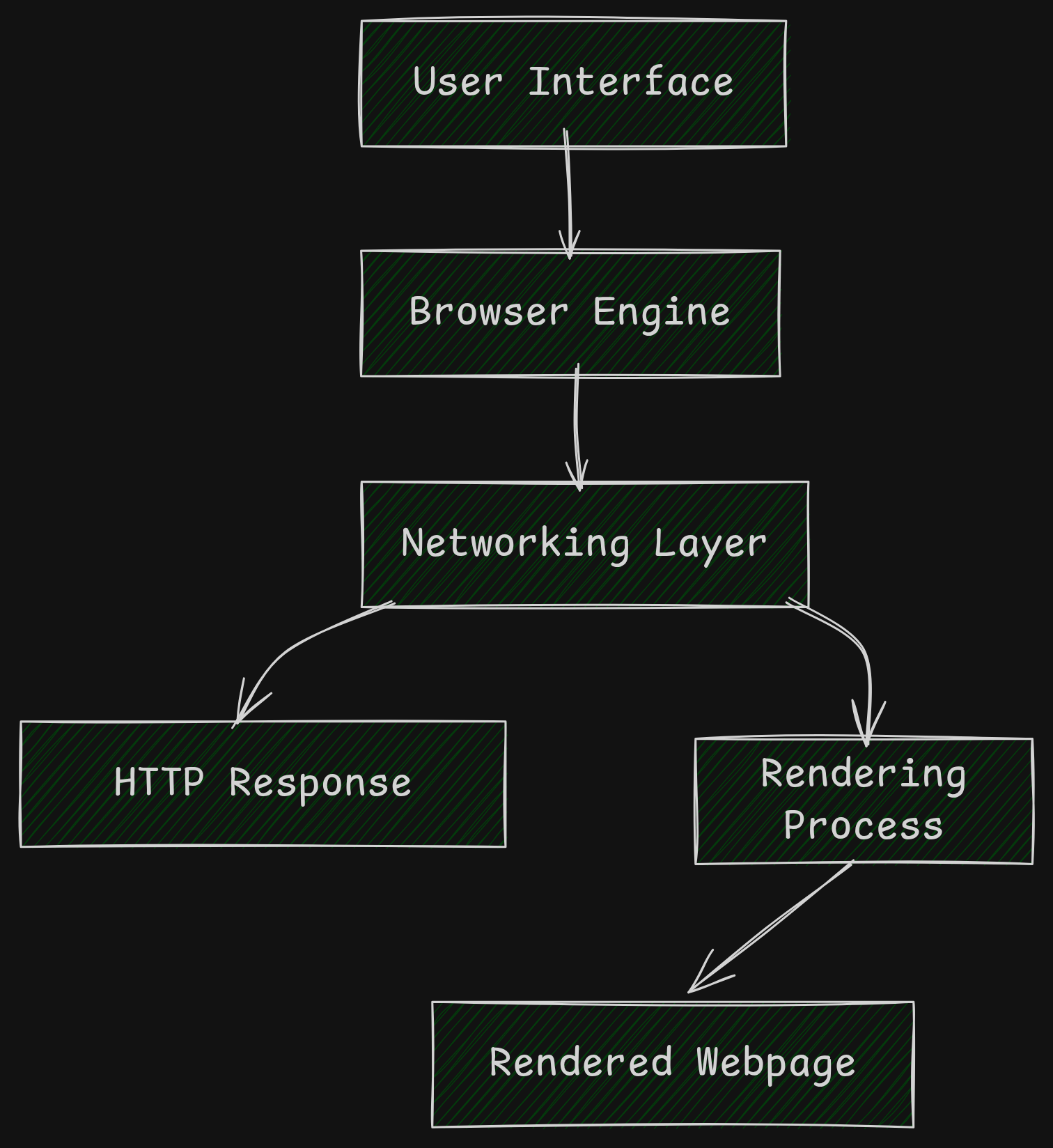 Browser Components
Parsers
Once the browser has HTML and CSS, it needs to turn the text into something which could be made sense of for rendering.
This is where parsing comes in the picture.
Parsing
MDN defines parsing as such
Parsing means analyzing and converting a program into an internal format that a runtime environment can actually run
Let’s take a look at a mathematical equation to actually understand what this definition even means.
The equation:
1
2 + 3 × 4
would be parsed to something like this:
1
2
3
4
5
    +
   / \
  2   ×
     / \
    3   4
HTML Parsing
Similar to the example, when browser receives HTML, the HTML parser performs a similar operation.
For example:
1
2
<h1>Welcome</h1>
<p>to Hudater's Blog</p>
would be parsed as:
1
2
3
4
5
6
Document
 └── body
      ├── h1
      │    └── "Welcome"
      └── p
           └── "to Hudater's Blog"
This parsed tree is sent to the Content Sink.
Content Sink takes parsed tokens, create the corresponding DOM objects and insert them into the document tree
CSS Parsing
And the same for CSS.
1
2
h1 { color: blue; }
p  { font-size: 16px; }
would be parsed as:
1
2
3
Stylesheet
 ├── h1 -> { color: blue }
 └── p  -> { font-size: 16px }
DOM and CSSOM
The tree parsed from the previous step is then turned into object models for both HTML and CSS
DOM
- DOM stands for Document Object Model
- It is the Object Model made from parsed HTML
- Defines the structure of the page
CSSOM
- CSSOM stands for CSS Object Model
- It is the Object Model made from parsed CSS
- Defines how the structured page would be stylized with styling rules
- CSSOM creation blocks rendering
Rendering
Now that we have the Object Models, we can look into the final process of rendering.
But as usual with browsers, it is a multi-step process consuming several components.
Reflow
Reflow is also knows as Layout.
At this stage, the browser computes geometry. We now have a layout of how the page would be rendered.
Painting
Once the browser has a layout, it needs to draw the elements.
The process of painting converts elements into actual visual instructions like:
- Draw background
- Draw border
- Draw text
- Draw images
- Draw shadows
At this stage, we have:
- Layout
- List of drawing operations
Compositing
Compositing is also knows as Display.
Modern browsers break the page into multiple layers such as background layer, text layer etc
The browser uses the GPU compositor to combine these layers efficiently
At last, we have pixels rendered on our display
Visualization
Here is a diagram to visualize how plain text turns into Pixels!
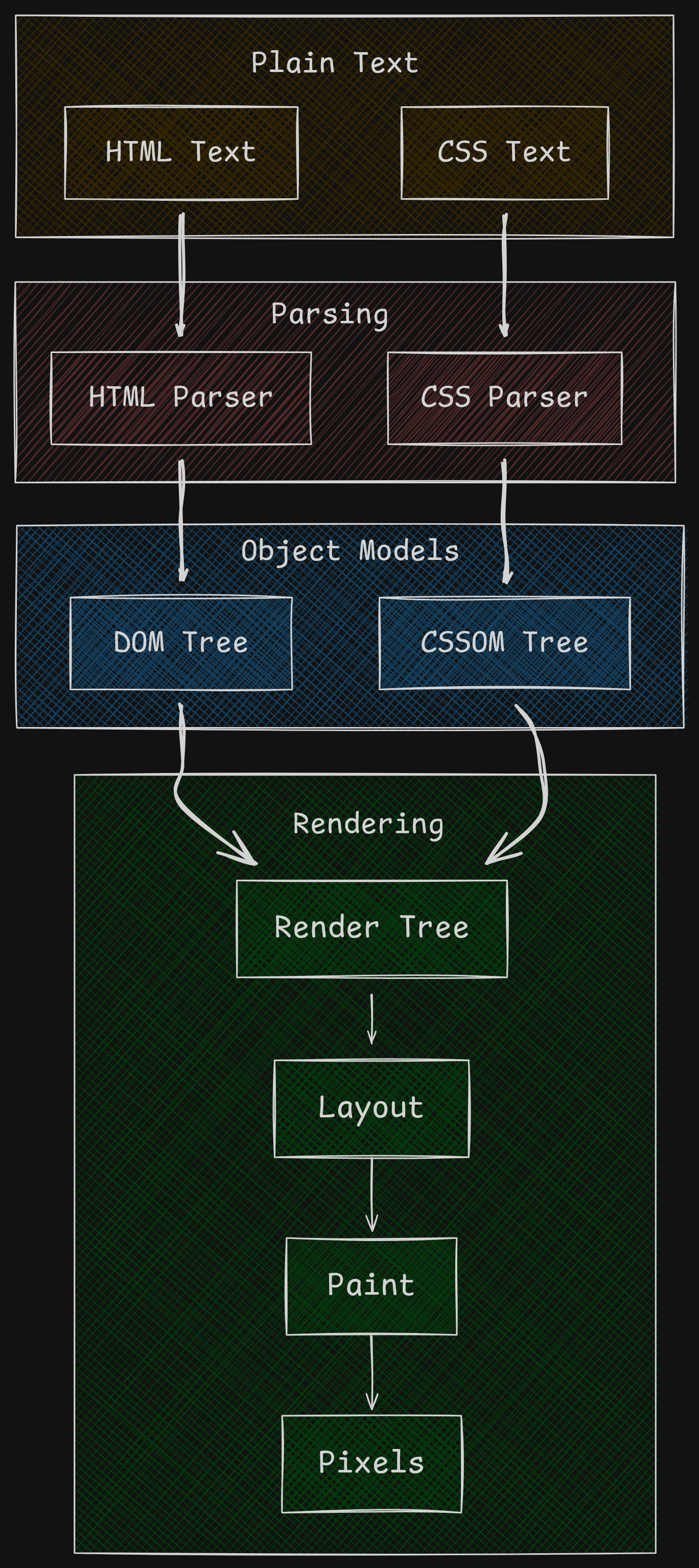 Rendering Process
Conclusion
So we now understand browsers! Well, definitely not in the first reading off this article.
If this is your first few times getting to read about browser internals, I would highly encourage you to read further into it.
Now that we have this general overview of our browser, it doesn’t seem magical!