TCP Explained: 3-Way Handshake (6/6)
Ever wondered why your browser doesn’t just start sending data?
How TCP makes the connection?
Recap
From the previous blog, we can recall that:
- TCP is a reliable protocol
- TCP has a certain process to establish connection
- TCP is stateful since both client and server maintain connection state
- TCP provides ordered delivery of data using sequence numbers
Primer
TCP starts transmitting data upon establishing the connection. In this blog, we’ll see how TCP establishes a connection, transfers data reliably, and terminates the session cleanly.
Sequence Number
TCP splits application data into segments based on the MSS of network connection which itself is derived from MTU
This requires larger data to be broken into parts thus TCP uses Sequence Numbers
A sequence number is a number TCP assigns to every byte of data sent in a connection.
It acts just like page numbers in a book. It tells the receiver exactly where each piece of the transmitted data belongs.
Both sides agree on starting sequence numbers before exchanging real data.
Sequence number is the reason TCP can guarantee Ordering and detect missing data.
Connection
The TCP 3-Way Handshake is the process TCP uses to establish a connection between two devices before any real data is exchanged.
TCP cannot just start sending packets immediately, because it must ensure:
- The other side is reachable
- Both sides are ready to communicate
- Sequence numbers are synchronized
- The connection state is properly initialized
This connection setup happens in three steps, hence the name:
- SYN
- SYN-ACK
- ACK
Only after this handshake does TCP begin sending application data.
Handshake
Let’s assume your computer is the client and a website server is the server
The process of handshake and acknowledgments make TCP reliable
Client -> Server: SYN
The client starts the connection by sending a packet with the SYN flag set. SYN stands for “Synchronize”
At this point, the client is just sending a message to the server saying:
“I would like to start a connection, Here is a sequence number”
Packet situation;
1
Client -> Server: SYN (seq = n)
Server -> Client: SYN-ACK
The server receives the SYN, and responds with two things:
- SYN: A request to Synchronize with the client
- ACK: Acknowledgment for the SYN Packet of client
Server also sends over it’s own sequence number AND adds 1 to the client’s sequence number
Packet situation;
1
Server -> Client: SYN-ACK (seq = m, ack = n+1)
Client -> Server: ACK
Finally, the client sends back an ACK packet confirming the server’s response.
Packet situation;
1
Client -> Server: ACK (ack = m+1)
Visualization
Here is an image visualizing the 3-way Handshake Process 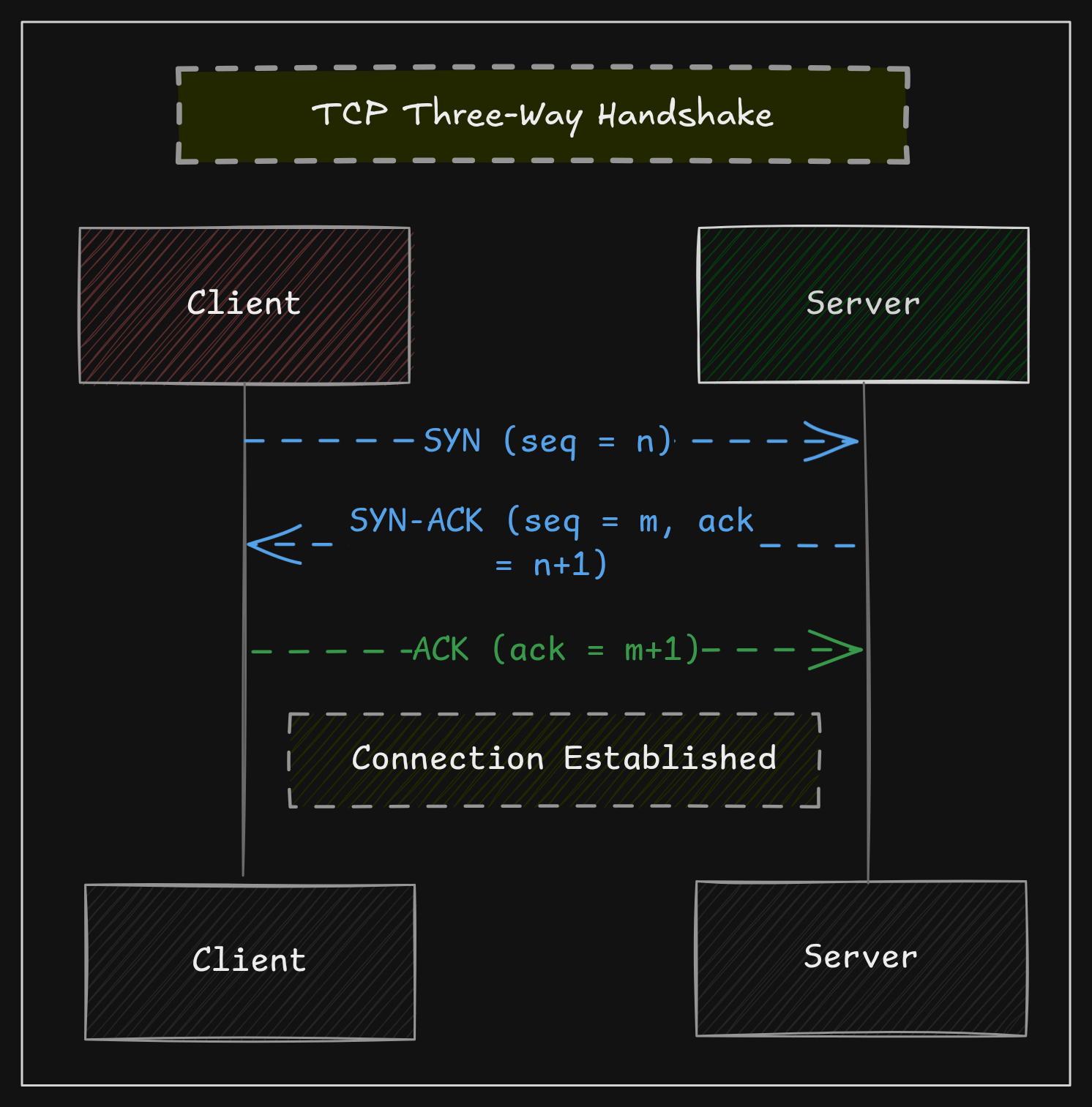 3-Way Handshake
At this point, a bi-directional connection has been established between the client and the server. Data transmission can now begin
Checksums
TCP includes a checksum in every segment. This ensures the data was not corrupted in transit.
If corruption occurs during transmission:
- The segment is discarded
- Receiver doesn’t send back ACK
- Sender retransmits the packet
Checksums ensure data integrity
Retransmission
The sender assumes packet loss when:
- It does not receive an ACK for a segment within the expected time
- It receives multiple duplicate ACKs, indicating the receiver is still waiting for the same missing sequence range
- The retransmission timeout (RTO) is reached
Once packet loss is detected, TCP retransmits the missing segment to ensure reliable delivery.
Retransmission ensures data is sent and received as whole
Retransmission Timeout (RTO) is a mechanism that triggers when a sender does not receive an ACK for transmitted data within a specific timeframe
Connection Termination
Just like TCP requires a handshake to start, it also requires a proper process to close.
TCP terminates connections using a 4-step FIN handshake.
Why 4 way? Why not just 2 packets?
TCP closes each direction independently, so both sides must finish sending
Client Sends FIN
The client, when it wants to close the connection, sends a packet with the FIN flag set. FIN stands for “Finish”
At this point, the client is just sending a message to the server saying:
“I have no more data to send, I would like to close this connection”
Packet situation;
1
Client -> Server: FIN
Server Sends ACK
Server receives the FIN packet and acknowledges the Finish request
Packet situation;
1
Server -> Client: ACK
Server Sends FIN
Server tells the Client that it too doesn’t have any more data to send and would like to close the connection
Packet situation;
1
Server -> Client: FIN
Client Sends ACK
Client acknowledges and sends the last ACk packet
Packet situation;
1
Client -> Server: ACK
At this point, the TCP connection has been gracefully closed!
Conclusion
That was it in this series of blogs for networking.
At this stage, we have a solid understanding of how data is transmitted over the web.
In further blogs, we will delve inside the Browser and polish up some Web fundamentals.
FIN!