TCP vs UDP Explained: Reliable vs Fast Networking (5/6)
What if your video calls ran 30 seconds behind?
What if your file download missed random chunks?
This is where the speed vs reliability debate comes into place
Data Transmission
Looking at how us humans communicate, we can deduce few simple facts. The most basic one being:
We need common language to communicate with each other.
But there are certain rules and etiquette to this communication. Most people follow them which creates a general flow for conversations:
- We start with greetings
- We take turns speaking
- We try not to interrupt
- And we end with a goodbye
Similar to this, the wizards of Internet created a set of rules which computers need to follow to ensure communication over Networks.
Protocols
These set of rules are called Protocols.
A protocol defines things like:
- How data should be sent
- How the receiver should respond
- What happens if something is lost
- And how communication begins and ends
Without protocols, computers would not have rules and etiquettes. A communication without rules turns into just a mess of words.
Two of the most important protocols in networking are TCP and UDP. Both of them live at the transport layer in the OSI Model.Both of them sit on top of IP, which handles addressing and routing
We can summarize that:
- IP handles routing packets to the correct machine
- TCP/UDP decide the rules for how the data is actually transmitted once it gets there
TCP
TCP stands for Transmission Control Protocol. TCP is the protocol used when accuracy matters more than speed.
It behaves like a proper conversation:
- It establishes a connection first
- It keeps track of what has been sent
- It expects acknowledgements from the receiver
- And it retransmits anything that gets lost
Here is a diagram showing TCP Flow
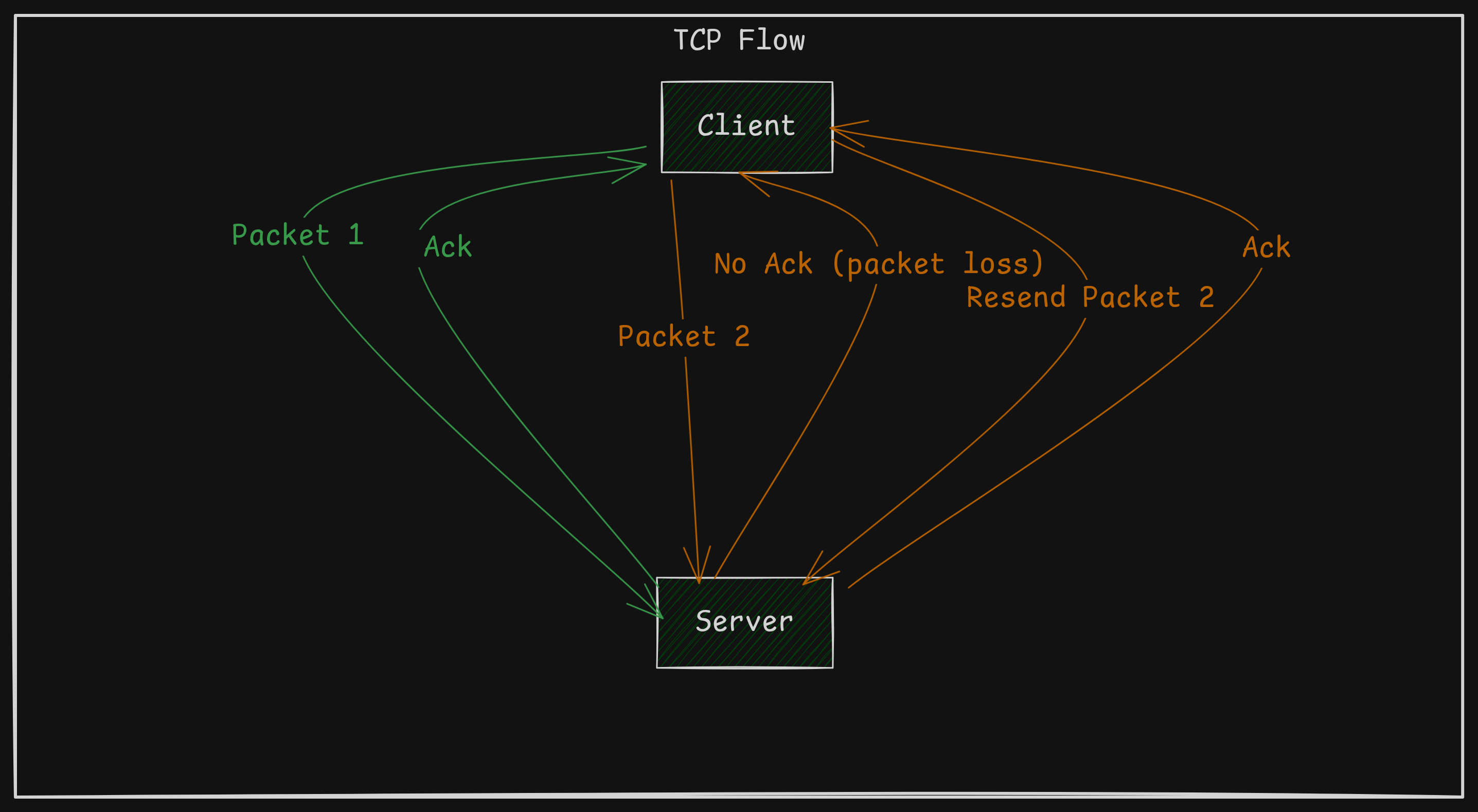 TCP Flow
UDP
UDP stands for User Datagram Protocol. It takes the opposite approach and is designed for speed and simplicity.
It sends data with minimal overhead, meaning there is:
- No connection setup
- No tracking
- No guarantees
- No retransmissions
Each packet is sent independently, almost like shouting a message and moving on.
UDP is stateless, each packet is independent
Here is a diagram showing UDP Flow
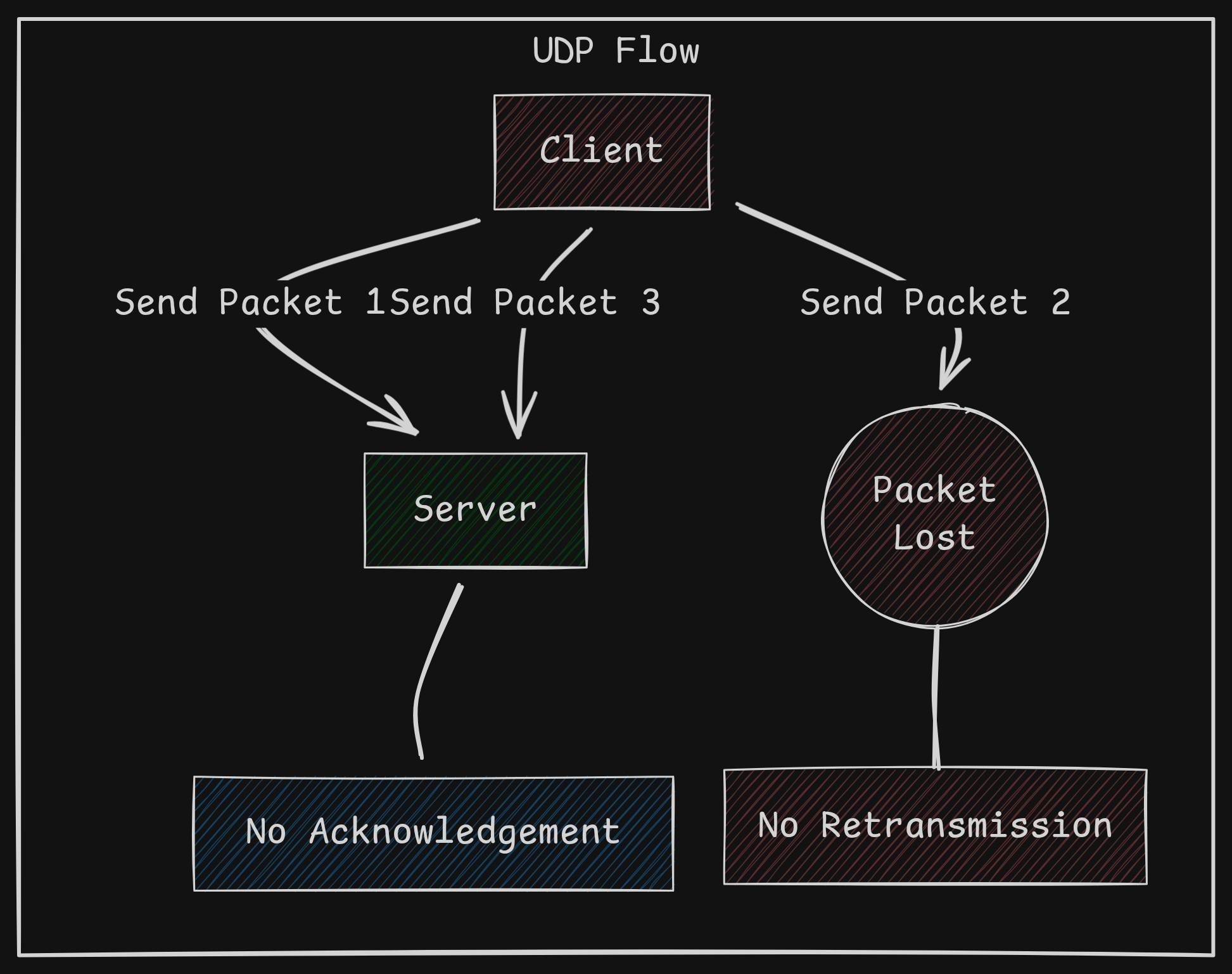 UDP Flow
Use Cases
UDP
A common beginner mistake is to think UDP is useless since there are no guarantees attached with it.
After all, why would anyone choose a protocol that doesn’t promise delivery, ordering, or retransmission?
But that’s the point of UDP! It is fast because there is no handshake and there are use cases for it. For example:
- Video and voice calls
- Online gaming
- Live streaming
- DNS queries
For all these use cases, a few dropped packets are fine but buffering or delayed response is not.
TCP
Being the conservative protocol TCP is, there are multiple obvious use cases for TCP:
- Web browsing
- File transfers (FTP, SFTP, Downloads)
- Email (SMTP, IMAP, POP3)
- Remote access (SSH)
For all these use cases, intact data delivery is integral. You don’t want your Linux ISOs missing a few Megabytes!
From the information we gained till now, it’s pretty clear there are pros and cons to both. We should now clear out some misconceptions about protocol layering.
HTTP and TCP
So we know TCP works on top of IP but what about HTTP?
First things first, HTTP != TCP
TCP is a transport protocol. Its job is to make sure data can travel reliably between two computers
HTTP is an application protocol. It defines the rules of communication, such as what’s a request, what’s a response and so on
Final Layering
So the stack looks like this:
| Layer | Protocol | Role |
|---|---|---|
| Application | HTTP | Web requests and responses |
| Transport | TCP | Reliable delivery |
| Network | IP | Routing packets across internet |
They come together and form a beautiful request-response cycle!
Conclusion
So now we understand why different protocols exist, let’s start diving into TCP in the next blog!