cURL: The Internet, Stripped of Its UI (4/6)
You click Email at hudater.dev to offer me a Job
Mail client opens
But what if I told you that button is just a very polite wrapper around a command-line tool?
Well it’s not exactly cURL under the hood but the principle remains the same: a client sends a request, and a server sends back a response.
What you triggered with that button click is exactly what cURL does but the good, ol’ CLI way: a request and a response
This simple, UNIX-like interaction of request-response is what makes cURL all that useful for us.
Terms
We should clarify some terms before starting with cURL.
Client
- A client is anything that makes a request.
- Examples
- GUI Browser like Chrome
- cURL
- If something is asking for data, it’s the client.
Server
- A server is the machine (or program) that responds to requests.
- Examples:
- A website backend
- An API service
Request
- A request is the message sent from client to a server.
- It usually includes:
- What you want
- Where you want it from
- Sometimes extra info (headers, authentication)
- Example request: “GET /users”
Response
- A response is what the server sends back upon a request
- It contains:
- A status code (success or failure)
- Data (HTML, JSON, etc.)
- Example response: {“username”: “Hudater”}
API (Application Programming Interface)
- An API is basically a server endpoint meant for programs, not humans.
- Instead of giving you a webpage, it gives you data.
- Data can be in format like:
- JSON
- XML
- Plain text
- Meant for programs to consume, not humans
Protocol
- A protocol is a set of rules for communication.
HTTP (HyperText Transfer Protocol)
- HTTP is the basic communication language of the web.
- It defines rules for how requests and responses work:
HTTPS
- HTTPS is just HTTP, but encrypted and secure.
- The “S” stands for Secure
URL (Uniform Resource Locator)
- A URL is the address of something on the internet.
- Example: https://hudater.dev
Status Codes
- When a server responds, it includes a number showing what happened
- Some common Status Codes:
- 200 - OK (success)
- 404 - Not Found
- 500 - Server error
cURL Explainer
At its core, cURL is a tool to transfer data using URLs.
cURL supports multiple protocols but one we will use here is HTTP and HTTPS. It’s like the networking part of a browser minus the GUI.
Why cURL
We need cURL because it gives the most direct way to communicate with servers.
It shows the server’s response as-is, including the raw output and important details like HTTP status codes. This makes cURL extremely useful for testing and debugging applications without relying on a browser or frontend.
cURL is especially common when working with APIs, where the goal is to send requests and receive data directly, usually in formats like JSON.
cURLing away
Let’s try cURLing my links webpage
1
curl https://hudater.dev
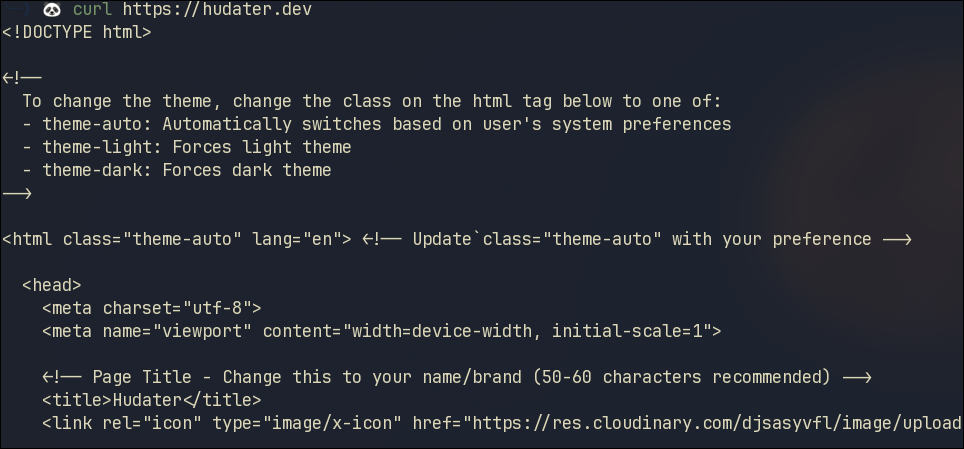 cURL Webpage
This command sends a simple HTTP GET request to the server and prints the response directly in your terminal.
In the response screenshot, we can see we get pure HTML back which would be rendered if we sent the request via a GUI Web Browser
Verbose
That wasn’t very useful for debugging. Let’s try the -v flag which will enable verbose output mode showing us more information about the connection, request and response
1
curl -v https://hudater.dev
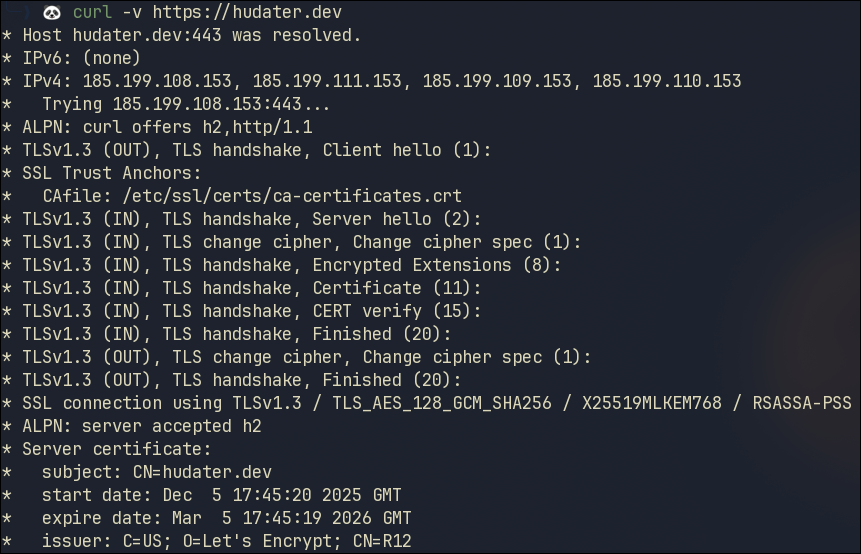 cURL verbose Header
 cURL verbose Footer
If you executed this cURL command, you would be able to see:
- DNS Lookup
- TCP Connection (handshake)
- HTTP Request being made
- Response Status Code
- Response Headers
Specifying HTTP Verbs
The default behavior when running cURL is to perform a GET operation but we can specify operation verb using:
1
curl --request HTTP_VERB_HERE URL_HERE
or
1
curl -X HTTP_VERB_HERE URL_HERE
GET
Let’s do a GET operation on an API from FreeApi.app
1
curl -X GET https://api.freeapi.app/api/v1/public/randomjokes/joke/random
 cURL GET Response
POST without Parameters
The POST method is used to send data to the server.
It is a simple write operation.
Once the POST request has been made, the server can process the data.
Let’s do a POST operation on the Kitchen Sink API Endpoint from FreeApi.app
1
curl -X POST https://api.freeapi.app/api/v1/kitchen-sink/http-methods/post
 cURL POST Response
Since this is just a Kitchen Sink Endpoint, meaning it’s just there to practice and sends back 200 response code upon receiving POST request
POST with Parameters
Let’s do a POST request to Register user API endpoint, again from FreeApi.app
1
curl -X POST https://api.freeapi.app/api/v1/users/register
 cURL POST Fail
In the response, we get Status Code 422 which means the request has Unprocessable Content.
From the API documentation, we can see that we need to provide certain data with the request.
Now we will do a POST request with correct data
1
2
3
4
5
6
7
8
9
10
curl --request POST \
  --url https://api.freeapi.app/api/v1/users/register \
  --header 'accept: application/json' \
  --header 'content-type: application/json' \
  --data '{
  "email": "user.email@domain.com",
  "password": "test@123",
  "role": "ADMIN",
  "username": "doejohn"
}'
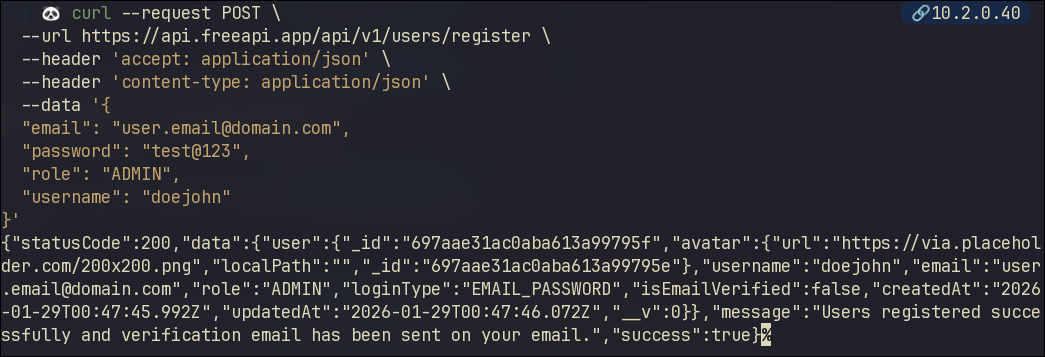 cURL POST Success
This time we get Status Code 2XX which means the request was successful!
This command has some extra flags, here is an explanation:
| Flag | Meaning |
|---|---|
| –header ‘accept: application/json’ | Tells the server to send back data in JSON Format |
| –header ‘content-type: application/json’ | Tells the server you are sending data in JSON Format |
| –data ‘{“key” : “value”}’ | This is the data you are sending |
Common Pitfalls
Beginners are bound to make mistakes, most we can do is beware!
Here are some common mistakes to avoid:
- Mixing up lowercase and uppercase Flags
- For example:
-Xis equivalent to--requestwhile-xis used to specify proxy to use
- For example:
- Sending data without specifying data format
- This could cause Failed method call, make sure to specify your sent data format
- Not Using Quotes Around Data
- Improper quotes would cause data to be interpreted as shell commands, watch out!
Visualization
Here is a diagram explaining Browser flow
 Browser Interaction
And another one explaining cURL flow
 cURL Interaction
Conclusion
Now we understand what cURL is, how to make requests using cURL and much more.
In the next blog, we might be doing some handshakes ;)