How DNS Actually Works: Root Servers to Your Browser (3/6)
How exactly did hudater.dev packet travel?
Did it fly its way over that Github Server?
Well, it worked it’s way through a chain of authority.
Let’s dive in and travel with our packet!
Quick recap
DNS (Domain Name System) is the system that converts human-friendly names into machine-usable IP addresses.
Hooman wants: hudater.dev
Computers know: 185.199.111.153
All DNS does is create a bridge between these two parties so when you type hudater.dev you get a website and don’t need to remember a string on dot-separated numbers
DIG
In this blog, we will go through this global internet dictionary called DNS using our beloved tool: dig
From Arch Man pages:
dig is a flexible tool for interrogating DNS name servers. It performs DNS lookups and displays the answers that are returned from the name server(s) that were queried. Most DNS administrators use dig to troubleshoot DNS problems because of its flexibility, ease of use, and clarity of output. Other lookup tools tend to have less functionality than dig.
Bare dig and NS
So dig performs DNS resolution for you, great! Let’s try and run it.
1
dig
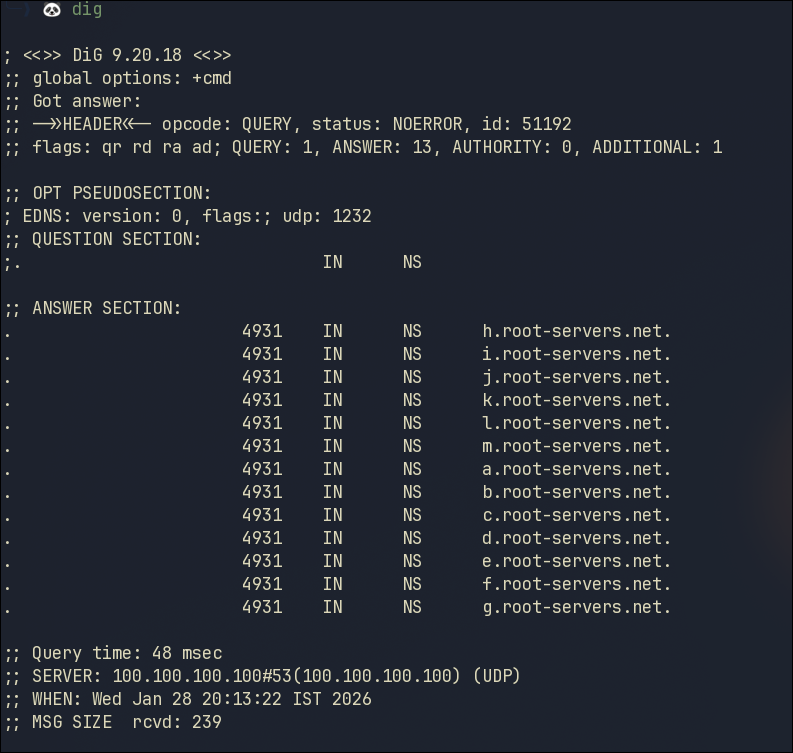 dig output
When you run dig without any options, it will default to running dig . NS in most cases but this is dependent upon the package maintainer
From the last blog, we know that Name Servers (NS) are used to define who the authority for a domain name is.
Since we effectively executed dig . NS, we get the Name Servers for root zone i.e, the root of DNS
The response we get in ANSWER SECTION is formatted this way:
| ZONE | TTL | CLASS | TYPE | VALUE |
|---|---|---|---|---|
| . | 81275 | IN | NS | f.root-servers.net. |
| . | 81275 | IN | NS | g.root-servers.net. |
| . | 81275 | IN | NS | h.root-servers.net. |
| . | 81275 | IN | NS | i.root-servers.net. |
| . | 81275 | IN | NS | j.root-servers.net. |
| . | 81275 | IN | NS | k.root-servers.net. |
| . | 81275 | IN | NS | l.root-servers.net. |
| . | 81275 | IN | NS | m.root-servers.net. |
| . | 81275 | IN | NS | a.root-servers.net. |
| . | 81275 | IN | NS | b.root-servers.net. |
| . | 81275 | IN | NS | c.root-servers.net. |
| . | 81275 | IN | NS | d.root-servers.net. |
| . | 81275 | IN | NS | e.root-servers.net. |
Explanation of ANSWER SECTION in the response
| Value | Meaning |
|---|---|
| . | The Root Zone |
| 81275 | TTL = cache for 81275 seconds (this can change) |
| IN | Internet class |
| NS | Nameserver record |
| h.root-servers.net | One of the root DNS servers (a-m: 13 logical root servers) |
Root Servers
You might have heard there are 13 servers responsible for the whole internet! or something along those lines.
Well that’s an overstatement. The fact is:
- There are 13 logical server identities
- Each identity is backed by thousands of servers
Here is the URI to official root servers website
Root servers are are authoritative for the Root Zone (.)
These root servers store a few thing, most important one of those for us: Which nameservers are authoritative for each TLD zone.
Resolver and dig
Empty NS Response
Now we can use the dig command to further drill down into specific TLDs.
Let’s check the dev TLD
1
dig dev. NS
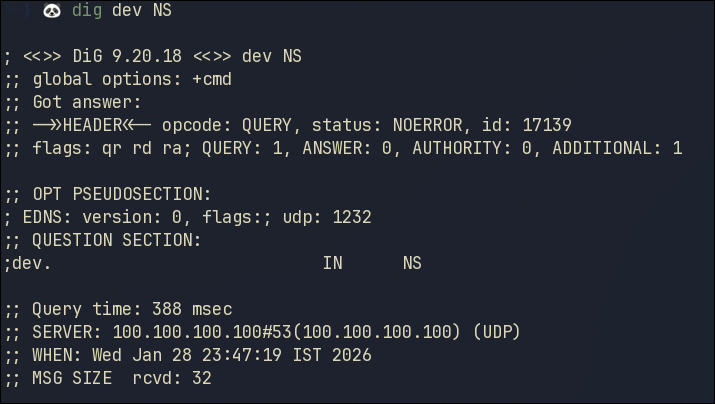 dig dev NS failed output
Looking at that response, we didn’t get any Name Servers and the status NOERROR
We just got ourselves an empty NS response due to our DNS Resolver.
Resolver Delegation Metadata
From our previous dig response, we can see the resolver which was used
1
SERVER: 100.100.100.100#53(100.100.100.100) (UDP)
By default, dig will use whatever is your system’s current DNS Resolver which in my case is 100.100.100.100
#53 represents the port used which is 53 for DNS by default
UDP is the protocol which was used, again, the standard default for DNS
In a Linux system, your DNS Resolver is specified in the /etc/resolv.conf file. For me, it’s my headscale’s DNS resolver which is Pi-hole forwarding queries to Unbound, which acts as a recursive resolver for my tailnet.
From what I understood with my limited knowledge and research, this chaining caused resolvers to optimize for answering domain lookups thus we were not able to get delegation metadata for TLD zones. I would be doing further research into this odd behavior, if you understand why did this occur, please reach out to me via mail or comment on this blog
Long story short, We need to query the root servers from our first dig response.
We can specify any DNS Resolver to dig something like this:
1
dig hudater.dev NS @1.1.1.1
TLD Authority
Querying a root authoritative server directly, we can execute:
1
dig dev. NS @a.root-servers.net.
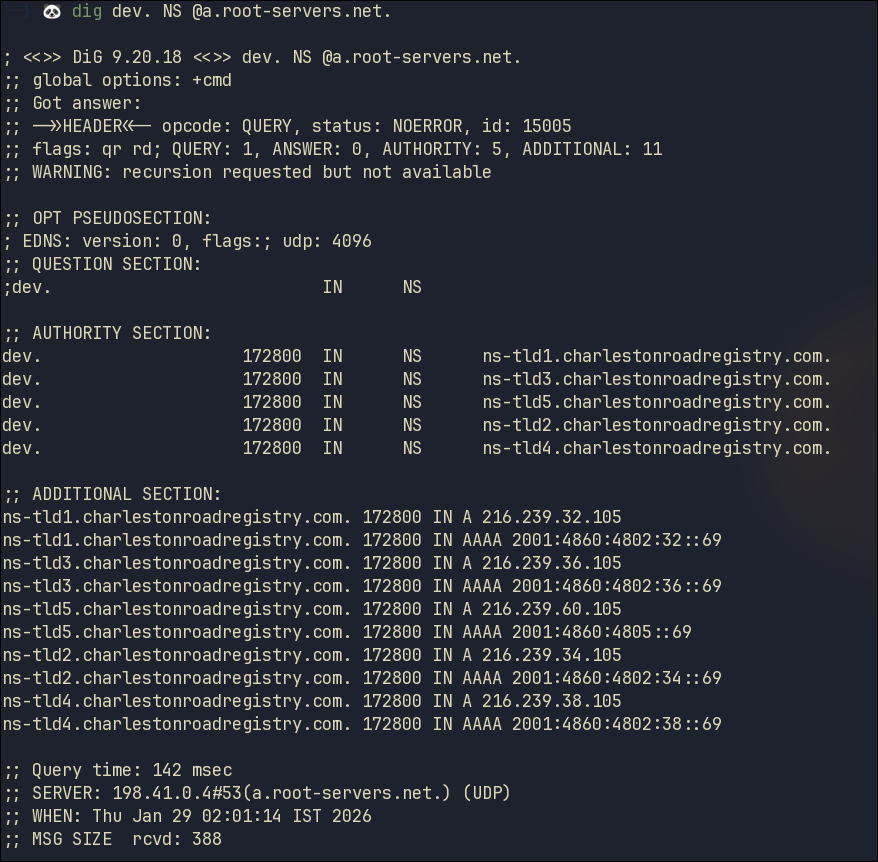 dig dev NS correct output
The response we get in AUTHORITY SECTION is formatted this way:
| ZONE | TTL | CLASS | TYPE | VALUE |
|---|---|---|---|---|
| dev. | 172800 | IN | NS | ns-tld1.charlestonroadregistry.com. |
| dev. | 172800 | IN | NS | ns-tld3.charlestonroadregistry.com. |
| dev. | 172800 | IN | NS | ns-tld5.charlestonroadregistry.com. |
| dev. | 172800 | IN | NS | ns-tld2.charlestonroadregistry.com. |
| dev. | 172800 | IN | NS | ns-tld4.charlestonroadregistry.com. |
Explanation of AUTHORITY SECTION in the response
| Value | Meaning |
|---|---|
| dev. | TLD dev Zone |
| 172800 | TTL (this large since NS rarely changes) |
| IN | Internet class |
| NS | Nameserver record |
| ns-tld1.charlestonroadregistry.com. | One of the authoritative DNS NS for TLD dev (registry owned by Google) |
As we can see from the response we get, our authority has changed. So now we need to use that authority to go further down into chain to query for a FQDN under the dev TLD
Domain Authority
Let’s check for hudater.dev
1
dig hudater.dev. NS @ns-tld1.charlestonroadregistry.com.
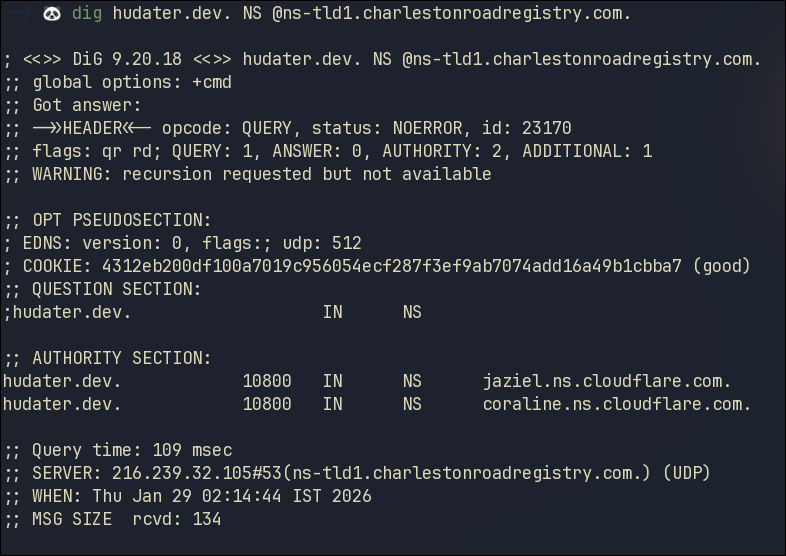 dig hudater.dev NS output
Again in the above response we get 2 Authoritative NS for the domain hudater.dev
This time the NS are by Cloudflare, which is correct since my domain hudater.dev is using Cloudflare as its Name Servers
Final Authority
We will now go further into this chain and query the Cloudflare NS from this response
1
dig hudater.dev. NS @jaziel.ns.cloudflare.com.
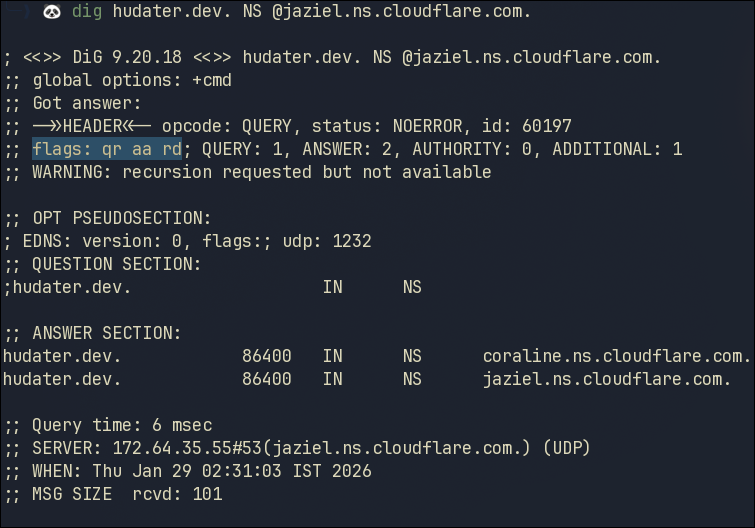 dig hudater.dev NS AA output
This is the final Authoritative Answer for our domain!
But how do we know for sure this is the final authority?
The highlighted aa flag in the response Header stands for Authoritative Answer
This denotes that Cloudflare is authoritative for the zone that owns hudater.dev
To further verify this claim, we can enquire for Start of Authority (SOA) Record
1
dig hudater.dev SOA @jaziel.ns.cloudflare.com
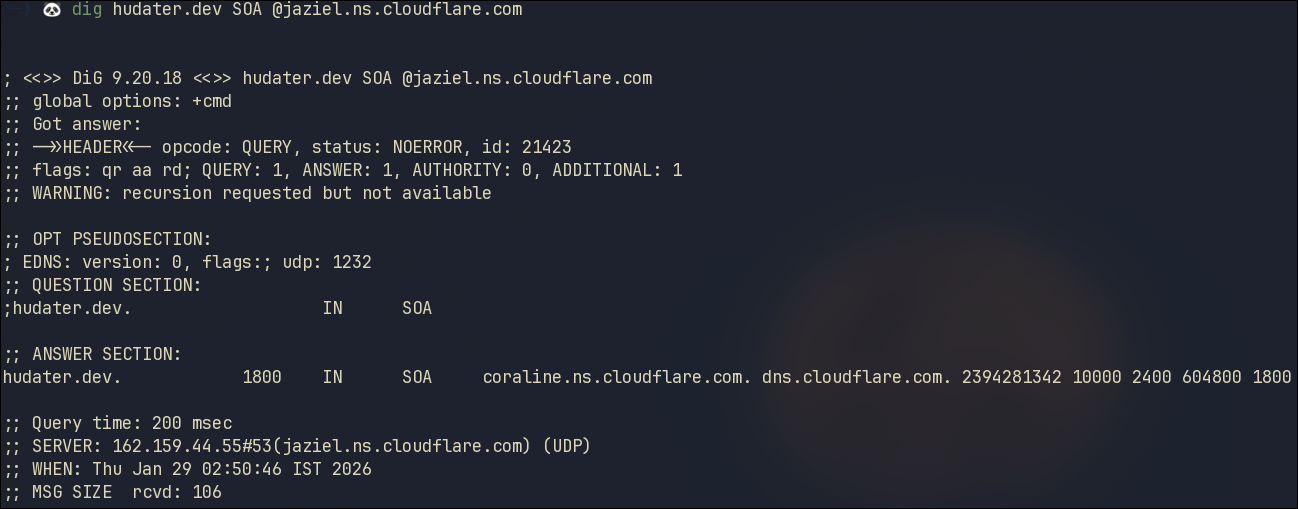 dig hudater.dev SOA output
Since we get an answer from this NS for SOA record, we can be sure this is the Authority for this zone. If we used any other NS in this command, we would not get a SOA answer
Domain IP from Authority
To get the IP for this domain, we now need to query the Authoritative Cloudflare Name Servers from the response for A records
1
dig hudater.dev. A @jaziel.ns.cloudflare.com.
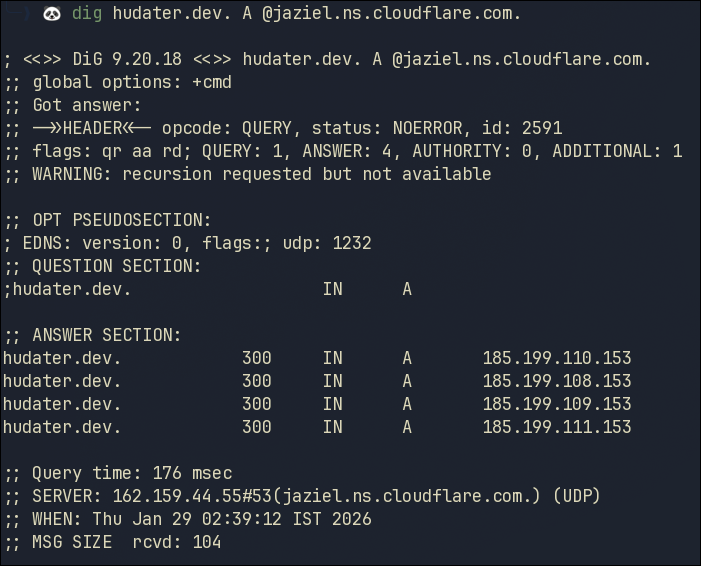 dig hudater.dev A output
Finally, we have the IP!
And if you recall from the previous blog, our A records are correct.
Conclusion
Here is an image representing all this flow for DNS in a visual way
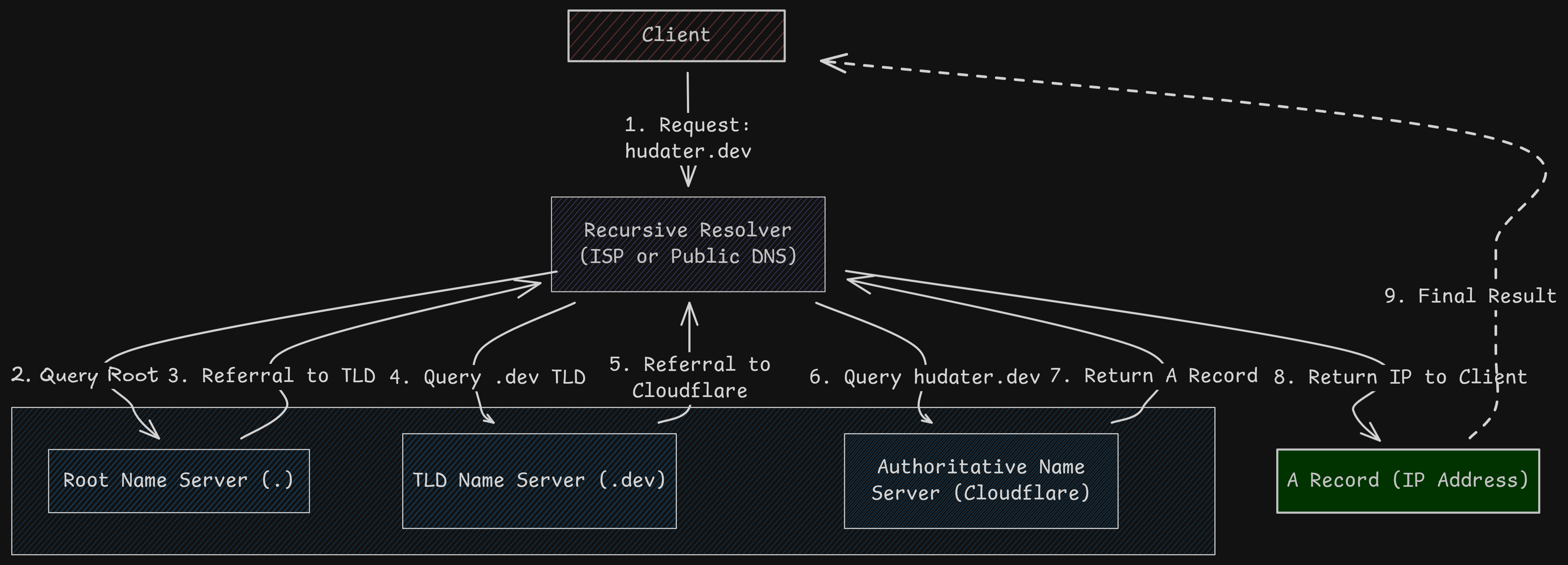 Hudater.dev DNS Flow
Good for us there already exists DNS resolvers which would do all this just to feed us with webpages!