DNS Record Types: Names and Pointers (2/6)
You type hudater.dev
On your screen is a beautiful links page
But pause for a second.
Did my computer just guess the website location?
Did the page arrive through magic?
Of course not.
This is DNS at work.
IP Address
It all started with some numbers and dots.
Remember the network we created previously? When you connect to it via Ethernet or WiFi, you are assigned an IP Address
IP stands for Internet Protocol and the service which assigns you an IP automatically is called DHCP.
An IP assigned by this DHCP server is known as an DHCP Lease since it’s not static, by default, in most cases
IPv4
IP Address is 32 bit number of 4 octets separated by dots. 4 octets mean 8 bits each.
What this jargon translates to is this:
- We can have max 2^32 unique addresses (~4.3 billion)
- Something like:
192.168.1.1 - But never
300.300.320320.3232because that’s not 8 bits for each octet
IPv6
When networks were first created, these 4.3 billions seemed like a lot. What the creators underestimated was the drive of Human Laziness
A few smart toilets here, smart bulbs and now we have run out of IPv4 addresses. Please welcome IPv6
Instead of 32 bits, we now have 128 bits total, approx 3.4 * 10^38 addresses. These addresses look something like this 2001:db8::8a2e:370:7334
IPv5
Why did we skip IPv5?
Well, there used to be something like IPv5 in early 90s. It didn’t exist as IPv5 but rather Internet Stream Protocol
It was never deployed publicly but was an experimental protocol to implement real time communications like video calls
IP and Servers
When you deploy an EC2 instance on AWS or connect your router to your ISP, you are assigned a Public IP Address.
Public Address because others on this wide open internet need to communicate with you and vice versa so all this convoluted setup serves a purpose
If we allow it in our firewall, anyone can hit our IP Address and would be served with content we set-up like a website!
Remember these bits
So now we have an address for our computer on the internet with a website on it. Everyone just needs to remember the IP Address.
Yea, that doesn’t seem like a good idea.
Flat Names
We should give it a friendly name like mybeautifulsite
If you floated that idea to a Senior Dev, you would get a smack on your head and an explanation something like this:
- Simple strings as names mean no hierarchy
- No hierarchy translates to a huge single list of names
- There is a limit to a string being both memorable and typeable for humans
- It would not scale
Hierarchal Names
So we need to add hierarchy to names. Taking inspiration from Filesystems, we use dots(.)
Root
Root of this whole hierarchical naming system is denoted by a single dot . It’s just there for representation, you it doesn’t have any IP address associated with it.
TLD
One level below that are TLDs (Top Level Domains)
The dev in hudater.dev is the TLD. What TLD provides is a clear separation of concern.
Second-Level Domain
One level below TLD exists Second-Level domain. The hudater in hudater.dev is the Second-level domain
This form of domain name is probably the most common.
This is the address we can buy for ourselves and use for our website. Also known as Registered Domain
Subdomain
From this point on, we can create Sub-domains and sub-subdomains and so on
blog in blog.hudater.dev is the subdomain
Visualization
1
2
3
4
5
.                        (root)
└── dev.                 (TLD)
    └── hudater.dev.     (domain you own)
        └── blog.        (subdomain)
            └── gh.      (sub-subdomain)
Fun Fact: You can add an extra dot at the end of any domain name and it behaves the same. That final dot simply represents the DNS root (.), because every FQDN technically ends at the root.
FQDN
This whole name, i.e, gh.blog.hudater.dev is knows as Fully Qualified Domain Name or simply Domain Name
DNS Records
Nameservers
You own a domain, but how would Browser know where to ask for your domain’s addresses? This is where Name Server Records come into picture.
NS Record tells who the authority for a certain domain is
Typically, the place where you bought your domain from is the Authority for Domain but it can very easily be changed to any other provider, Cloudflare being one of the famous providers
A Record
A record, also knows as Address Record, points a FQDN to an IPv4 address.
It is the most basic DNS Record which you would most probably use for your website
For example:
| Record Type | Name | Content |
|---|---|---|
| A | hudater.dev | 185.199.108.153 |
| A | hudater.dev | 185.199.109.153 |
| A | hudater.dev | 185.199.110.153 |
| A | hudater.dev | 185.199.111.153 |
But there are multiple A records for same target, which IP would be returned to client?
DNS resolver would typically utilize a load balancing technique such as Round Robin to return an IP to the client.
AAAA Record
Just like A record, Quad A records point to an IP but this time it is IPv6
Why four A instead of single A?
IPv4 is 32 bits while IPv6 is 128 bits. 32*4=128 therefore 4 As
CNAME Record
CNAME stands for Canonical Name. A CNAME record points to an A Record or another CNAME Record
CNAME Records are useful when you need to point multiple domain names or FQDNs to a single IP
For example:
| Record Type | Name | Content |
|---|---|---|
| CNAME | blog | hudater.dev |
| CNAME | docs | hudater.dev |
CNAME Record is commonly used to point to a domain where you don’t control the DNS records such as Github Pages, Hashnode etc
MX Record
Mail eXchange Record tells the sender where email should be delivered.
Typically, each domain has multiple MX Records which point to different mail servers for redundancy
Each MX Record has a priority value. Lower priority value is preferred
For example:
| Record Type | Name | Content |
|---|---|---|
| MX | hudater.dev | route1.mx.cloudflare.net |
| MX | hudater.dev | route2.mx.cloudflare.net |
| MX | hudater.dev | route3.mx.cloudflare.net |
TXT Record
TXT records are just plain, old text. TXT Records are used to verify ownership of domain, email security etc
Let’s Encrypt uses TXT record to verify domain ownership when requesting a TLS Certificate using DNS Challenge (don’t look up how we used to get TLS Certs before Let’s Encrypt)
To protect against mail spoofing attacks, SPF, DMARC and DKIM protocols are used which are based on DNS and executed via TXT records
Read more about Mail security here!
TTL
Time To Live (TTL) is a numerical value (in seconds) associated with a DNS record.
To ensure fast and efficient responses, DNS answers are cached at multiple layers, including the browser, the operating system, and most importantly recursive DNS resolvers.
A cached DNS entry remains valid only for the duration of its TTL. Once the TTL expires, the cached copy is discarded. The next time a query is made, the resolver must perform a fresh lookup by contacting the authoritative name servers (following the DNS hierarchy if needed) until it retrieves the current IP address.
Real World Scenario
Table
Let’s take a look at a real world setup where a domain has A,CNAME, MX and TXT records setup:
| Record Type | Name | Content |
|---|---|---|
| A | hudater.dev | 185.199.108.153 |
| A | hudater.dev | 185.199.109.153 |
| A | hudater.dev | 185.199.110.153 |
| A | hudater.dev | 185.199.111.153 |
| CNAME | blog | hudater.dev |
| CNAME | docs | hudater.dev |
| MX | hudater.dev | route1.mx.cloudflare.net |
| MX | hudater.dev | route2.mx.cloudflare.net |
| MX | hudater.dev | route3.mx.cloudflare.net |
| TXT | _dmarc | “v=DMARC1;p=quarantine;rua=mailto:harshit@hudater.dev;ruf=mailto:harshit@hudater.dev;” |
| TXT | cf2024-1._domainkey | “v=DKIM1; h=sha256; k=rsa; p=a_random_public_key” |
| TXT | hudater.dev | “v=spf1 include:_spf.mx.cloudflare.net ~all” |
Visualization
Here is a flowchart style diagram visualizing this setup into pixels
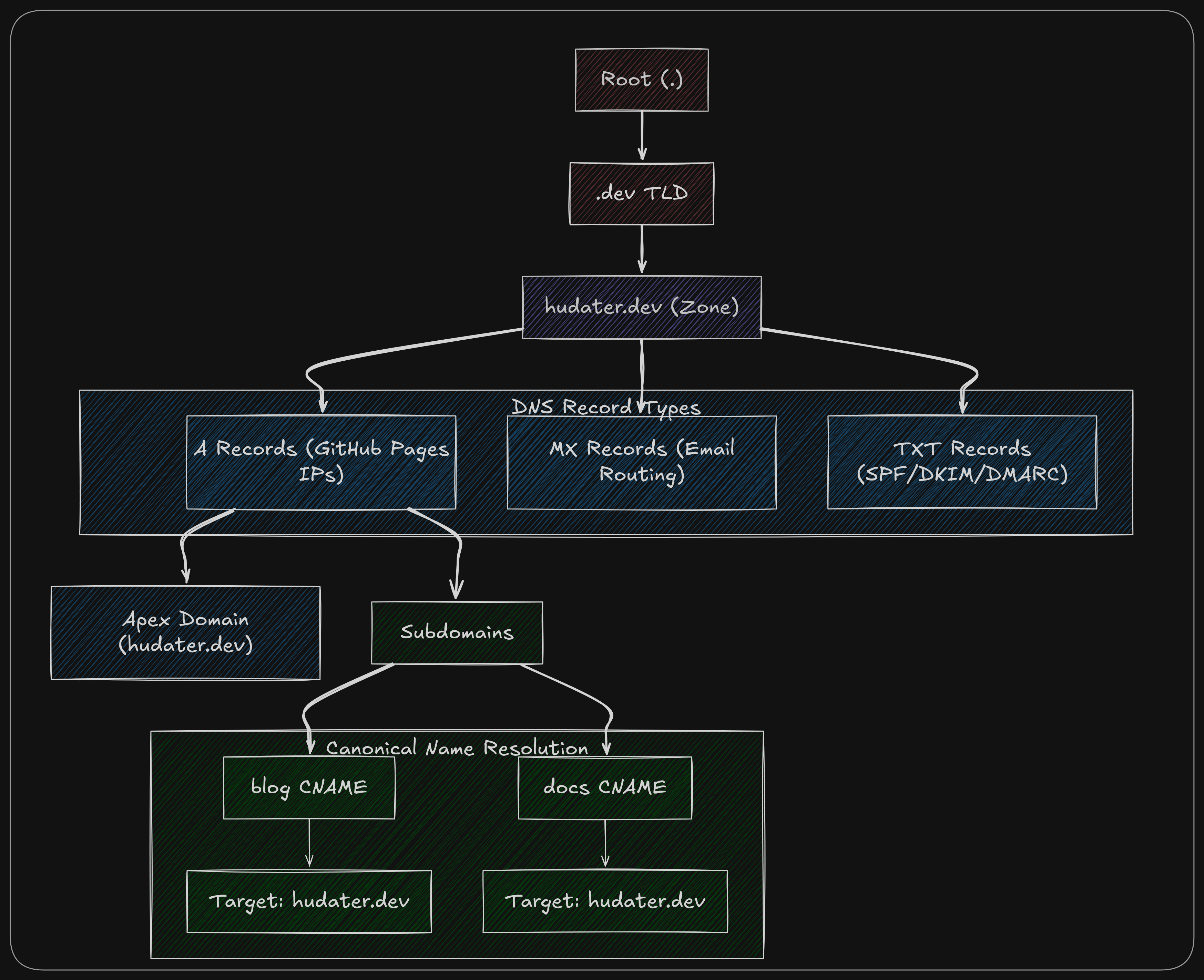 Hudater.dev DNS Setup
Explanation
This is my own domain’s DNS setup.
My registered domain (hudater.dev) has multiple A records which point to Github pages IP. As we know now, this will make sure traffic to hudater.dev would be load balanced and not dependent upon a single server (most probably, single Load balancer in front of a cluster of servers)
Since blogs.hudater.dev and docs.hudater.dev are both hosted on Github pages, they are CNAMEs pointed to my A records.
Incoming email at harshit@hudater.dev is handled by Cloudflare email routing and outgoing email is handled by smtp2go which are both facilitated using MX and TXT records alongside Cloudflare email routing rules.
All this DNS shenanigans for all my domains are managed using OpenTofu, HCP Cloud and Github actions. Take a look at that here!