Homelab Part 1 - Hardware, Locations, and Design Goals
I have been trying to start blogging and documenting my homelab for a long time (~2 years) but the biggest hurdle has been DIAGRAMS
Finally, on this Holy Day of 6th January 2026, I present to the people on the web with my Homelab!
This is going to be multi-part blog post which will be roughly divided into 5 parts where I will explain and reason:
- Why, Goals, Infra Overview
- Networking, DNS & Traffic Flow
- Cloud Services Used, Workload Placement
- Security, Identity & Observability
- Automation, Ideal Homelab Architecture
Why This Homelab Exists
I got into Homelabbing and Self-Hosting during 2023 when I was exploring Linux & Docker. Coming across YT Channels like Techno Tim, Chris Titus Tech, IBRACORP, The Lord’s Heir, and his Deepfake made me explore Open Source Tech which eventually led to need of Selfhosting and using Libre Software
Design Goals
My homelab has been designed and re-invented multiple times which led to me making some Design Choices such as:
- Separation between prod and lab
- Single ingress point
- Minimal public attack surface
Some of things which I would eventually like to perfect in this setup include:
- Strong identity and access control
- Reproducible infrastructure
- Avoiding Single Points of Failure
Locations / Tenancies
On-Prem Homelab
Due to a single High end hardware and 3 low spec devices I decided to divide Prod and Test into 2 mostly-independent environments former being an Independent PVE and PBS node and latter being a PVE Cluster to learn on
| Host | CPU | RAM | Environment |
|---|---|---|---|
| PC | Ryzen 5 5600x | 48 GB DDR4 | Prod |
| Pi-4 | Cortex-A72 | 4 GB LPDDR4 | Test |
| Acer | AMD A8-7410 | 16 GB DDR3 | Test |
| HP | i3-7020U | 32 GB DDR4 | Test |
Oracle Cloud Infrastructure (OCI)
This tenancy has high Uptime by the virtue of it being “Cloud” thus it has been crowned as the INGRESS Currently I am only effective using One ARM machine but I do have plans to utilize 3 VMs here to mitigate single point of failure to an extent. Keep in tune for that blog!
| Instance | Shape | Arch | Environment |
|---|---|---|---|
| OCI-Bom-ARM | VM.Standard.A1.Flex | ARM | Prod |
| OCI-Bom-AMD-1 | VM.Standard.E2.1.Micro | x86 | Test |
| OCI-Bom-AMD-2 | VM.Standard.E2.1.Micro | x86 | Test |
The two VMs in
Testenvironment are ephemeral
Virtualization Stack
Why Proxmox
Proxmox is quite a popular solution in the Selfhosting community which translates to better support. I also found it easier to get started with Proxmox with this support. Existence of PBS and PVE Helper Scripts now reinforces the decision of deploying PVE
Since Proxmox is based on KVM, guides lining out Hardware Passthrough work almost 1:1 on Proxmox. Underlying is a Debian Environment which makes it easier to debug, maintain and troubleshoot for a regular Linux user like me
VM vs LXC vs Docker
VMs are divided based on their usage such as Media for Media Server, k3s for VMs running Kubernetes Cluster etc. VMs are first-class citizen in the what-to-use debate in my Homelab. LXCs are used when I come across hardware constraints, such as, Single GPU Passthrough, SATA Passthrough when SATA bus is shared with USB bus in the motherboard
For specific service deployment such as DNS, Reverse Proxy etc, Docker is preferred unless using Docker would require additional un-necessary configuration or more importantly, additional Security Permissions which is the case when it comes to DNS
Both LXCs and Docker deploy services based on stacks such as DNS Stack which consists of Pihole, Unbound and Pihole-Updatelist. This way ensures I don’t over-complicate my infra but still retain necessary segregation
High-Level Architecture Explanation
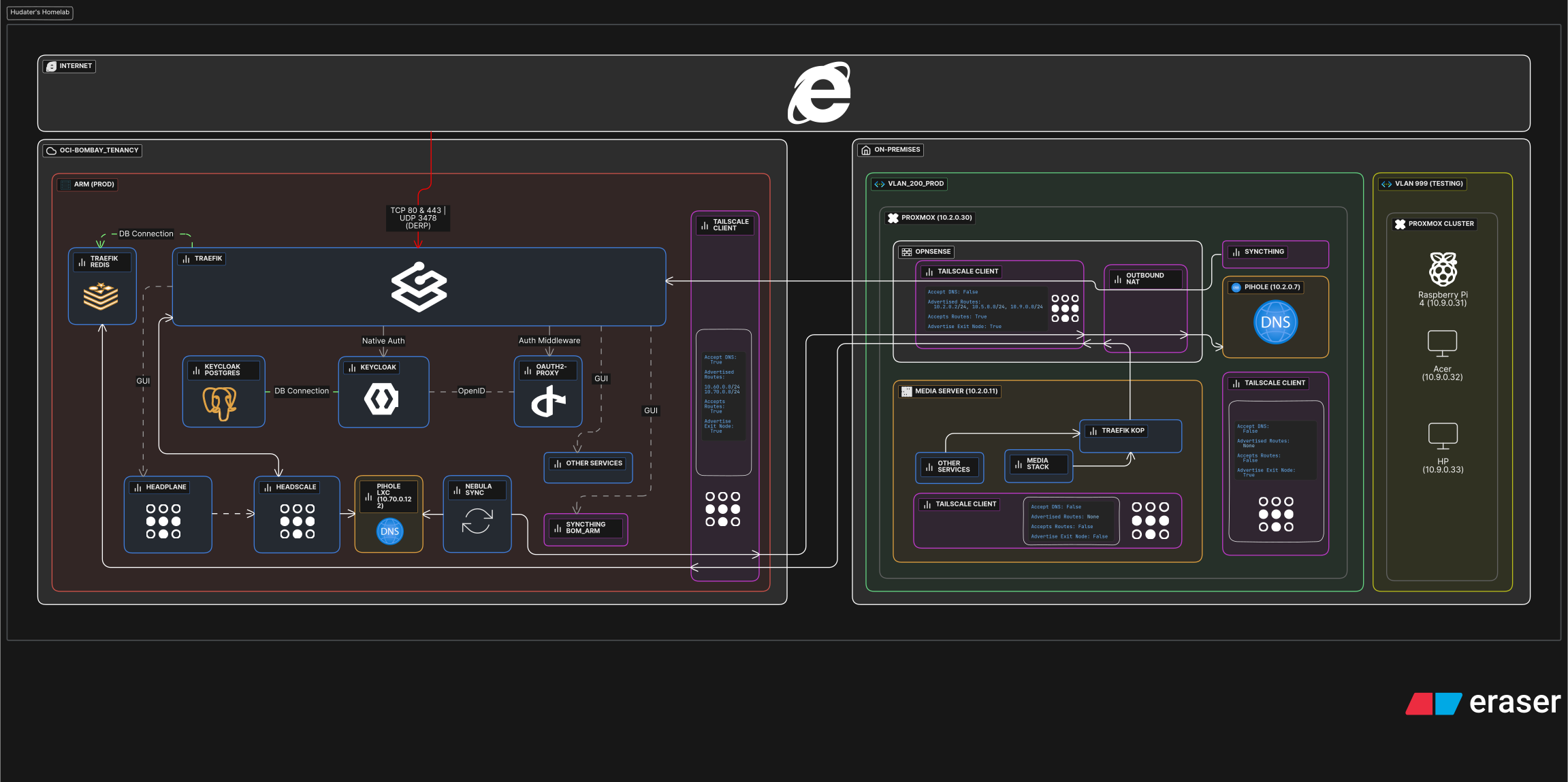
Let’s assume a request is sent to dash.example.com which corresponds to service: dash on Other-Services stack in Media Server at Proxmox PC On-Prem
The request will only reach Traefik at OCI-Bom-Arm. Traefik will check it’s backend i.e, File and Redis. If service is found, it will redirect to Keycloak and authenticated via:
1
2
Native Auth if    : service supports OAuth and OAuth is setup at service
Middleware Auth if: no native OAuth is setup AND oauth middleware is applied at service
But how does Traefik know where Dash service is at?
This is where Redis backend and Tailscale come to the picture!
Traefik-Kop is a service which writes to Redis over at OCI-Bom-ARM and traffic is routed using Headscale and Outbound NAT at OPNsense
Thanks!
Thank you for going through this long, complicated story of my Homelab, do leave your comment, react and share this with your Tech Ninja Friends!