Inside Git: Objects, References, and the Myth of Magic (3/3)
“In five days he created Git, and on the sixth day he rested.”
Or so they say.The speed makes for a good legend, but what’s worth appreciating is the engineering behind it.
The design goal behind Git was straightforward: fast, simple, and precise
To understand these design decisions and the quirky behavior of Git, we need to understand the .git directory and not just memorize commands.
When we run:
1
git init
Git creates a .git directory at the current working directory. The .git directory acts as a database for Git.
A little pre-requisite knowledge
Before we go any further, we need to clear a few points. These are required understanding before we get into Git
Plumbing and Porcelain
Git has two types of commands:
Porcelain - the friendly commands you use every day (git status, git commit, git log)
Plumbing - the low-level machinery that actually makes Git work (git cat-file, git commit-tree)
Porcelain commands are built on top of Plumbing commands. Essentially, most Porcelains are just wrappers on multiple Plumbing commands to make Git easier for day-to-day usage
We’re going to ignore the Porcelain for a bit and get Plumbing!
Git Internals
Objects, Trees and Blobs
Git is Built on Objects and at its core, Git is a content-addressed object database.
Those are just a whole lot of buzzwords to seem smart.
In essence:
- Object database means Git stores data as discrete objects
- Content-addressed means objects are identified by the content they store, not by names or locations
There are four object types, but three of them matter immediately:
Blob objects
- These store file contents.
- A blob knows only about raw data, nothing about filenames, permissions, or directories
- Comes from Binary Large Objects
Tree objects
- Trees represent directory structures
- Ties one or more blobs into a directory structure
- Can refer to other tree objects, thus creating a directory hierarchy
Commit objects
- Ties aforementioned directory hierarchies together
- Points to a single root tree
- Points to one or more parent commits
- Stores author, committer, timestamps, and the commit message
In simpler words
- Trees: Stores directories
- Blobs: Stores files
- Commits: Store when and why the snapshot exists
- Branch: A movable pointer
- HEAD: A pointer to a pointer
- Tags: Pointers with a bit of extra metadata
Add and Commit Internals
Git Add
Running git add internally just prepares data inside the .git directory
How Exactly?
- Reads the content (raw bytes) of the files in your working tree
- Hashes the file content and stores as a blob object in
.git/objects - If an identical blob already exists, Git reuses it (this means the file has not changed between commits)
- Finally, the blob hash is then recorded in the index (staging area) and mapped to the file path
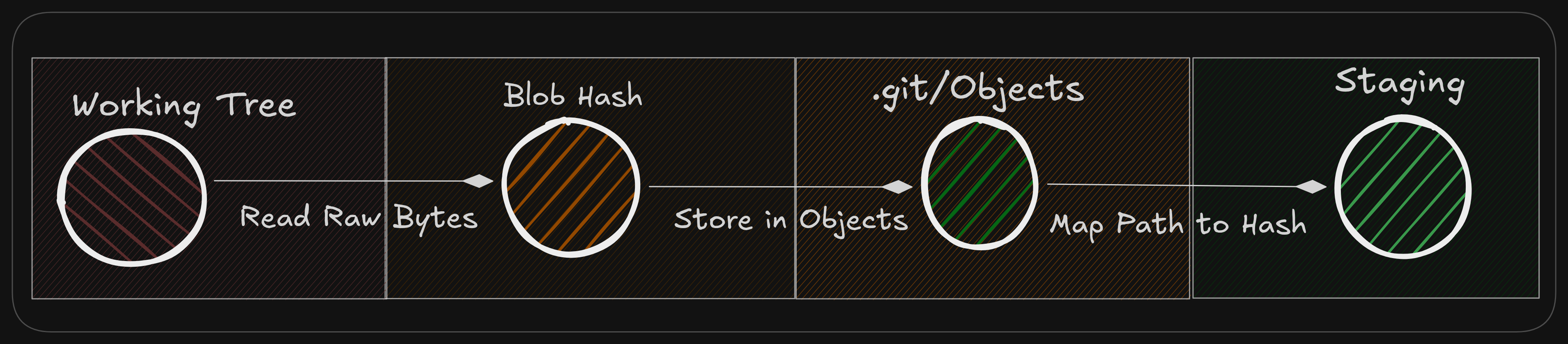 Git Add Internal Workflow
Git Commit
Internally, Git Commit works entirely off the index, not the working tree.
Again, how?
- Git reads the current state of the index, treating it as a complete snapshot.
- From the index, Git builds tree objects that represent the directory structure.
- Git creates a commit object that:
- points to the root tree
- points to one or more parent commits
- stores author, committer, timestamps, and the commit message
- The current branch reference is updated to point to this new commit.
- HEAD points to the branch, which now points to the new commit.
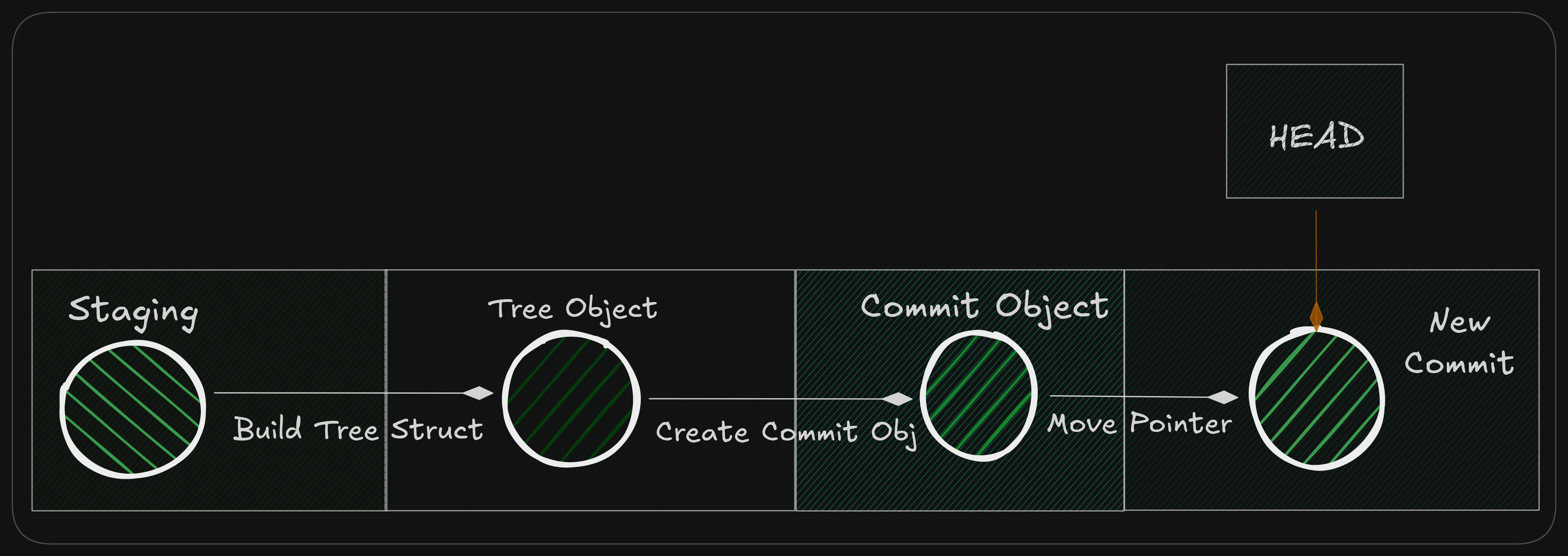 Git commit Internal Workflow
Hashes and Integrity
You might have noticed that we are constantly using hashes to identify everything in Git
But how does Git ensure that the data behind a hash stays true and unmodified?
Whenever Git stores an object (a blob, tree, or commit), it:
- Takes the raw content of the object
- Adds a small header describing its type and size
- Computes a cryptographic hash of that data
Objects are dependent upon multiple factors which implies their hashes are as well. For example:
- Blob object depends on the file’s exact contents
- Tree object depends on
- filenames
- file modes
- blob and tree hashes it points to
- Commit object depends on
- the root tree hash
- parent commit hash(es)
- author and committer metadata
- commit message
If any one of these dependencies changes, it triggers a domino effect, changing the hash of every object that depends on it.
This chain of dependencies is what guarantees data integrity in Git.
Conclusion
From this series of three blogs on Git, you now have a strong understanding of
- Why Git exists
- Basic workflow when working solo
- Internals of Git
At its core, Git is nothing more than hashes and pointers arranged in a clever way.